

AI for the Non-Technical Homeschool Parent · Module 2, Lesson 7.
Objective
This lesson covers two subjects that need practice more than explanation. By the end, you’ll know how to use AI as a conversation partner for a foreign language and as a writing coach that gives feedback without rewriting your child’s work.
Opening Story
Amanda’s 11-year-old wrote a paragraph about a camping trip. It said the trip was fun, her brother fell in the lake, and then they went home. Amanda knew it could be better, but every time she suggested changes, her daughter felt criticized. Amanda tried asking her AI assistant for feedback, with one important rule: don’t rewrite it. The AI praised the funny moment, then asked two questions her daughter could answer. Her daughter added four sentences, and the brother-in-the-lake scene became the best part.
The Reframe
With languages and writing, the hard part for parents often isn’t knowledge. It’s having time to practice, and knowing how to give feedback that helps without hurting. AI can be a patient practice partner and a gentle coach.
How This Works: Foreign Languages
Voice mode is your best tool here. It lets your child practice speaking and listening out loud. Try this:
“You are a friendly Spanish tutor for my [age]-year-old, who is a beginner. Have a simple conversation about [topic]. Speak slowly, use short sentences, and gently correct mistakes. Switch to English if they get stuck.”
You can also ask for vocabulary games, flashcards, or a short story using this week’s words. If you don’t speak the language, that’s fine. You can learn right along with your child, which is a great example for them.
Keep in mind that AI pronunciation is good but not perfect, and it isn’t a native speaker friend. Use it for daily practice, and look for real conversation opportunities when you can.
How This Works: Writing
The biggest risk with writing is that AI will simply rewrite your child’s work, which teaches them nothing. Prevent that in your prompt:
“My [age]-year-old wrote this: [paste]. Give feedback she can act on. Don’t rewrite it. Name one strength and two things to improve, written as questions she can answer.”
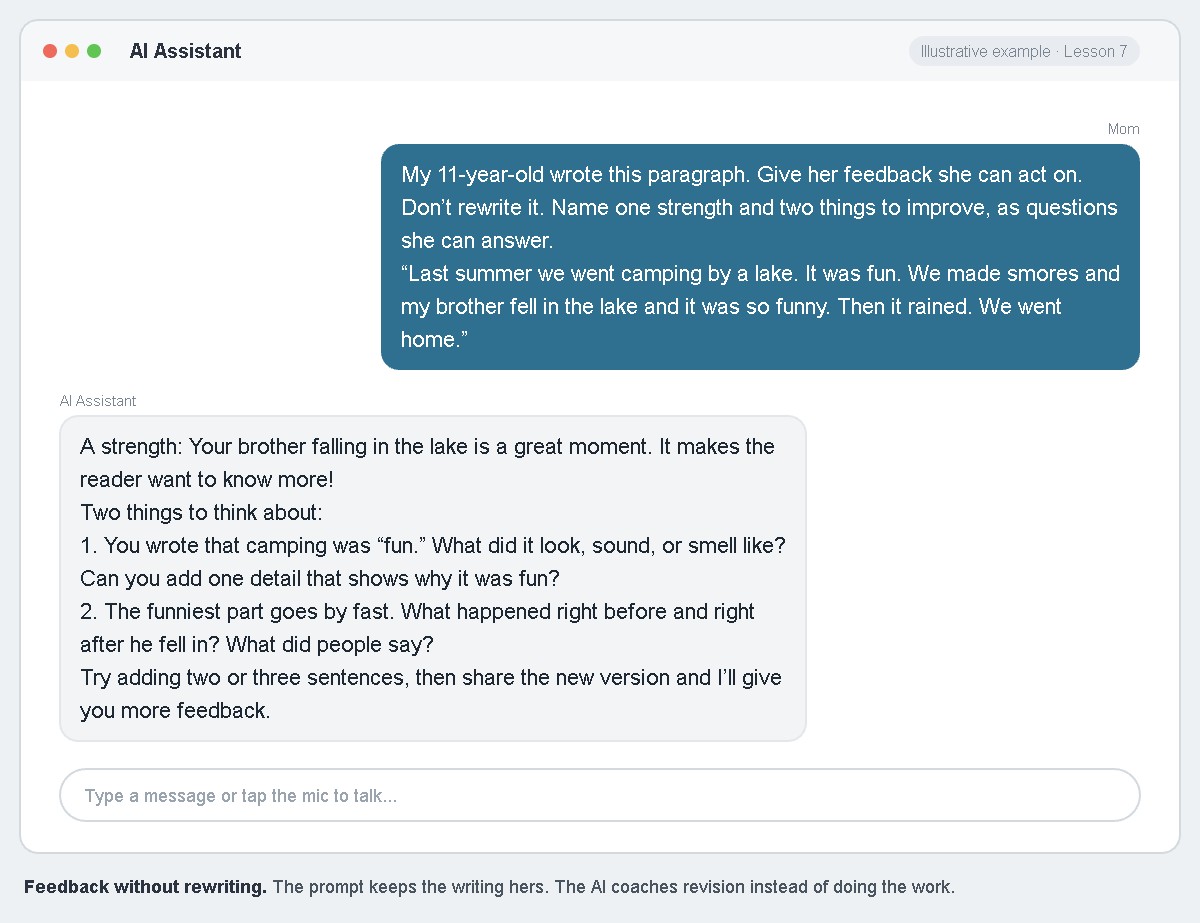
Questions like “What did it look, sound, or smell like?” make your child think and keep the writing theirs. After they revise, paste the new version and ask for the next round of feedback.
This Week’s Assignment
Choose one: run a five-minute language conversation in voice mode with your child, or get feedback on one paragraph your child wrote. Afterward, ask your child what they thought of it.
Looking Ahead
That wraps up Module 2. Next, Trailhead 3 turns toward your children and how they use AI.
Related Reading
See Lesson 8: Learning Style from The Faithful Homeschool Steward.
Continue Your Journey
← Back to the Full Table of Contents
Previous: Lesson 6: Science at the Kitchen Table
Next: Trailhead 3: Using AI Wisely, Begins
Join the H.E.R. (Home Education Revolution) Community at www.homeedrevolution.com