

AI for the Non-Technical Homeschool Parent · Module 3, Lesson 9.
Objective
This lesson teaches you to spot and check AI mistakes. By the end, you’ll have a simple three-question habit for checking answers, and you’ll know how to turn AI’s errors into great lessons for your kids.
Opening Story
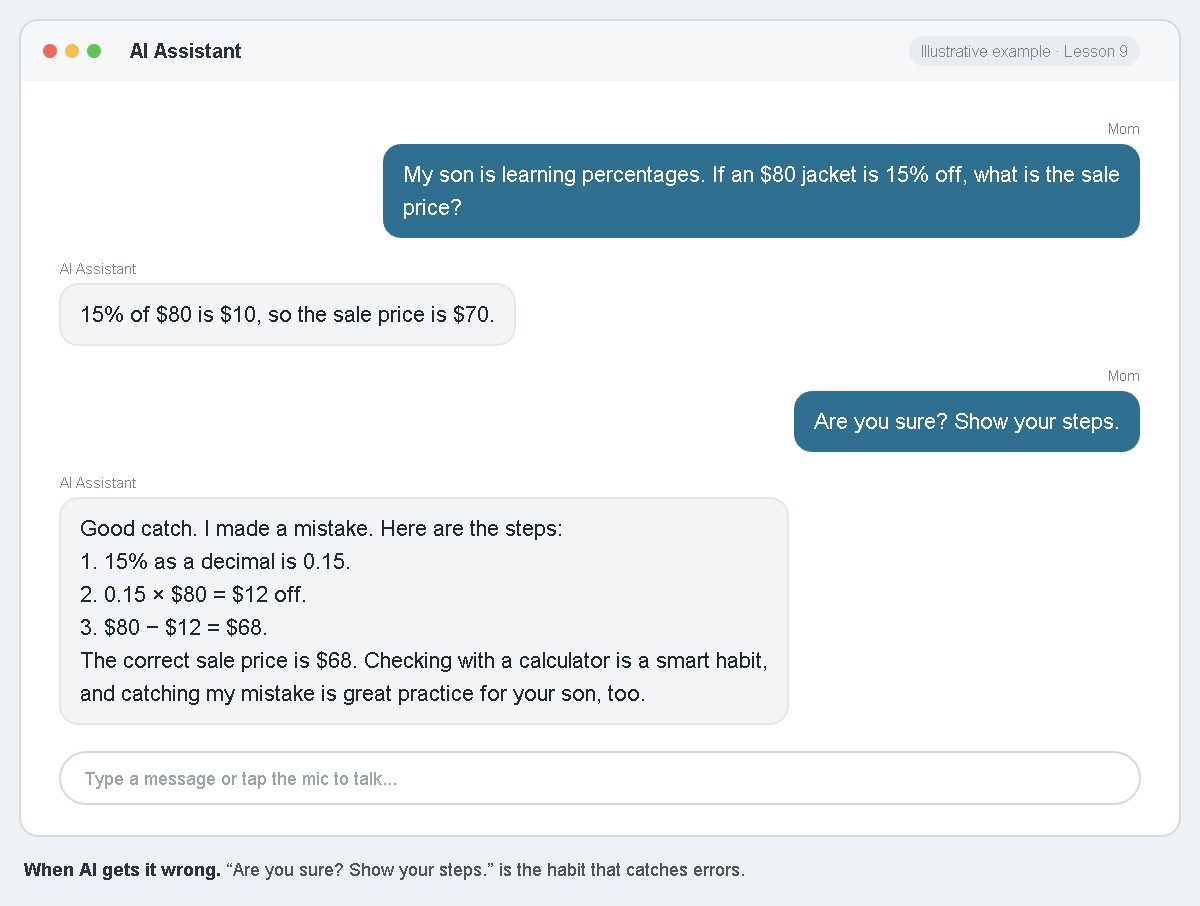
Beth’s son was learning percentages. She asked her AI assistant a quick question: if an $80 jacket is 15% off, what’s the sale price? It said $70. Something felt off, so she asked, “Are you sure? Show your steps.” It worked through the problem again, found its mistake, and corrected the answer to $68. Beth turned to her son and said, “Even the computer gets it wrong sometimes. Let’s check it ourselves.” He worked it out on paper, and they caught the mistake together.
The Reframe
AI sounds confident even when it’s wrong. That’s not because it’s trying to fool you. It predicts answers based on patterns, and sometimes the pattern leads it astray. The answer isn’t to stop using it. It’s to check what matters, the same way you’d double-check a fact from any single source.
How This Works
Use three questions whenever an answer matters:
1. “Are you sure? Show your steps.” This works especially well for math and logic. Asking it to show its work often helps it catch its own errors.
2. “Where could I check this?” Ask the AI to suggest a trusted source, such as your textbook, a reference book, or a reputable website. Then actually check it.
3. “Does this make sense?” Use your own judgment. If an answer seems strange, too simple, or too perfect, trust your instinct and dig deeper.
Some areas need extra care. Double-check numbers, dates, quotes, and facts about real people. Be especially careful with anything about health, safety, or medicine, and never rely on AI alone for those.
Here’s the best part: catching AI’s mistakes is wonderful critical-thinking practice for kids. Make it a game. Ask the AI a question, then have your child check the answer with a calculator, a book, or their own reasoning. When they find an error, celebrate it. They’re learning not to believe everything they read, and that skill will serve them far beyond AI.
Sometimes AI isn’t the right tool at all. If your child keeps struggling with a subject after several tries, consider a textbook, a trusted video series, a co-op class, or a real tutor. AI is one tool in your homeschool, not the only one.
This Week’s Assignment
Practice the three questions on at least two answers this week. Then play the “catch the mistake” game with your child at least once. Write down what you found.
Looking Ahead
You now have every skill this course teaches. In Lesson 10, you’ll put them together into a weekly rhythm that works for your family.
Related Reading
See Lesson 13: When NOT To Teach Something from The Faithful Homeschool Steward.
Continue Your Journey
← Back to the Full Table of Contents
Previous: Lesson 8: The Tutor That Asks Questions Back
Next: Lesson 10: Building AI Into Your Homeschool Rhythm
Join the H.E.R. (Home Education Revolution) Community at www.homeedrevolution.com