

← Back to the Confident Teacher curriculum map
← Previous: Something I’ve Noticed | Next: AI for the Parts You Dread: Grading, Feedback, and Daily Admin →
You Don’t Need to Be Tech-Savvy to Use This Well
If the words AI or ChatGPT make you feel nervous, overwhelmed, or resistant, you’re not alone.
If you are on a tight budget, don’t worry, there is a free version of ChatGPT that you can use to do the exercises in this lesson and solve most Homeschool needs
Many homeschool moms tell us things like:
- “I’m not good with technology.”
- “I don’t want screens replacing real learning.”
- “I’m afraid I’ll break something or do it wrong.”
- “I don’t even know where to start.”
This post is written for you.
Not to convince you of anything.
Not to rush you.
Just to gently show you how this tool works, step by step, so you can decide for yourself whether it’s useful.
You don’t need technical skills.
You don’t need special knowledge.
You don’t need to move fast.
Think of this as learning how to use a helpful notebook that can answer questions when you’re tired.
First, What AI Is (and What It Is Not)
Let’s clear the air.
AI, specifically ChatGPT, is:
- A thinking and planning helper
- A place to ask questions without judgment
- A way to organize your thoughts
- A support tool for you, the parent
AI is not:
- A replacement for parenting
- A replacement for teaching
- Something your child needs to use alone
- Something that takes control away from you
You are always in charge.
AI only responds to what you ask.
Step 1: Downloading ChatGPT (The Easy Way)
You can use ChatGPT on a phone, tablet, or computer. Most moms prefer starting on their phone.
On a Phone or Tablet
- Open the App Store (iPhone) or Google Play Store (Android)
- Search for: ChatGPT
- Look for the app made by OpenAI
- Tap Download or Install
- Open the app once it finishes installing
That’s it. You cannot break anything by opening it.
Creating an Account
You’ll be asked to:
- Enter an email address
- Create a password
This is similar to signing up for any app. Take your time.
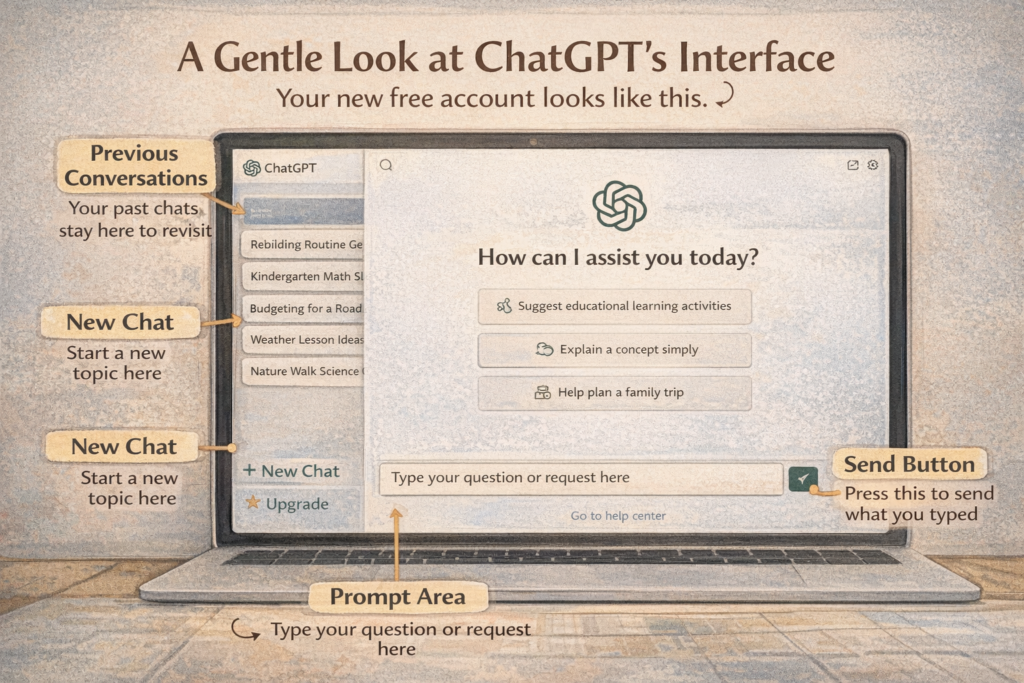
Step 2: What You’re Looking At When It Opens
When ChatGPT opens, you’ll see:
- A mostly blank screen
- A text box at the bottom where you type
- A send button (usually an arrow)
That’s it.
There are no menus you need to understand.
There are no settings you need to touch.
If you can send a text message, you can use this.
Step 3: Your First Input (Nothing Fancy)
This is the part that scares people, but it shouldn’t.
You do not need special wording.
You do not need to know “the right way” to ask.
Just type like you talk.
A Perfect First Question Might Be:
“I am a homeschool mom and I feel overwhelmed. Can you help me think through what to do next?”
Or:
“I’m new to homeschooling and don’t know where to start. Can you help me?”
Then press send.
ChatGPT will respond in plain language.
If you don’t like the response, nothing bad happens. You can:
- Ask it to explain differently
- Ask it to simplify
- Ignore it completely
You’re practicing, not performing.
Step 4: Understanding Prompt Structure (Without the Jargon)
You’ll hear people talk about “prompts.” Don’t let that word intimidate you.
A prompt is just:
What you type into the box.
Good prompts usually include:
- Who you are
- What you’re dealing with
- What kind of help you want
That’s it.
Example:
“I have a kindergarten-age child and want to gently review reading and math without pressure. Can you give me some ideas?”
That’s a complete prompt.
Step 5: Using AI as a Parent Helper (Not a Teacher)
The safest and most helpful way to use ChatGPT is behind the scenes.
Good uses include:
- Helping you understand a topic before teaching it
- Giving you ideas when your brain is tired
- Helping you simplify plans
- Helping you think through challenges
You can always:
- Read the response first
- Decide what feels right
- Change the wording
- Use only part of what’s suggested
Nothing goes directly to your child unless you choose it.
Step 6: Asking Follow-Up Questions (This Is Encouraged)
One of the best parts of ChatGPT is that you can keep talking.
You can say things like:
- “That feels like too much. Can you simplify it?”
- “Can you explain that like I’m new to this?”
- “Can you give me fewer ideas?”
- “That won’t work for my family. Can we adjust it?”
You’re not bothering it.
You’re using it correctly.
A Simple Practice Prompt to Try Today
If you want one safe place to start, try this:
“I am a homeschool mom who is not very comfortable with technology. Can you help me use ChatGPT gently and simply to support my child’s learning without pressure?”
Read the response slowly.
You don’t have to do anything with it yet.
Final Reassurance
You do not need to become “good at technology” to use AI well.
You only need:
- Curiosity
- Permission to learn slowly
- Confidence that you are still the parent
Using ChatGPT doesn’t mean giving up control.
It means giving yourself support.
And you are allowed to accept help.
If you have questions, hesitations, or just want to say, “This still makes me nervous,” you’re welcome to share here. That’s what this forum is for.
← Back to the Confident Teacher curriculum map
← Previous: Something I’ve Noticed | Next: AI for the Parts You Dread: Grading, Feedback, and Daily Admin →